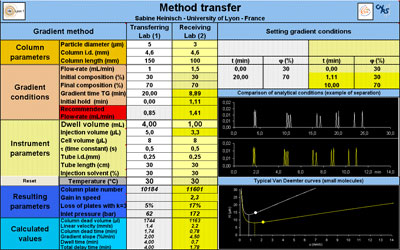
Abstract This chapter contains a downloadable calculation tool which can help the members of Chromedia to transfer their own gradient methods.
LevelAdvanced
This tool calculates the appropriate gradient conditions to maintain an equivalent situation when transferring a method from "lab 1" to "lab 2". Some useful parameters are also calculated including the inlet pressure, the column plate number, the gain in speed, the loss in plates due to extra-column dispersion and the recommended flow-rate according to the column temperature.
This tool is designed to calculate correct parameters when transferring a method to another lab, another instrument or another column (with the same packing material).
- The Excel file can be downloaded from Chromedia. It is a large file and downloading may take five or more seconds.
- It contains helpful comments indicated by a red triangle in the upper right corner of a cell.
- When you start to use and explore the tool, a “getting started” comment for first use is located - as an Excel comment - at the top of the file.
- We did not want to overload the sheet with too many explanations. The user should ideally go exploring the tool and play with it without having to read a long and boring text.
- Red cells may appear to warn you for parameters needing attention for instance if they are outside the reasonable values.
- In addition, it shows Van Deemter curves to check whether the linear velocity is well chosen.
- It shows an illustrative chromatogram to check if the two separations are equivalent.
- We would greatly appreciate feedback from users so we can improve the tool where necessary. Sabine Heinisch.
Gradient transfer calculation tool. (Click to download Excel file).